Mon, Aug 22, 2011
Offers Advanced Flight Planning Option
Flight Guide has rolled out its upgraded iEFB v4.0, offering a
brand new Flight Planning option that allows operators to quickly
and easily create a Flight Plan on any of the apps high resolution
Seamless Charts. Using "Your Flight Plan," waypoints can be created
by either typing in an airport identifier or by using the "One
Touch" add, remove and insert waypoint feature. Intersections
and navaids can also be quickly located, or search for nearest
airports to add to the flight plan without ever leaving the chart.
Selecting the "Flight Planner" main menu page allows the user to
reorganize waypoints, auto reverse the flight plan, customize
airplane profiles, file a flight plan and more. Flight Plan out of
view? The one touch "Display Route" icon allows the entire route to
be viewed instantly.
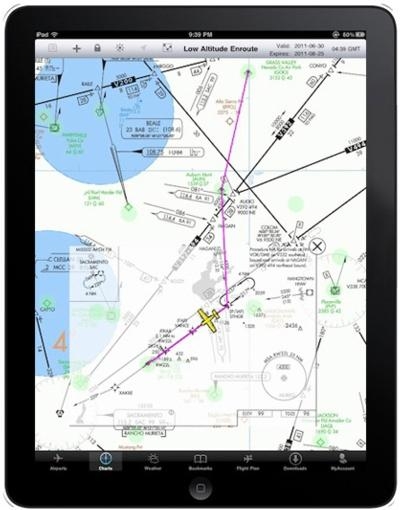
With Flight Guide's "PLUS" plans, Instrument Approaches and/or
Flight Guide Airport Diagrams can be overlaid on the Seamless
Charts in geo-referenced location. Simply zoom in on the desired
airport icon, using Apple’s standard “pan, pinch &
drag” interface and watch as the entire Flight Guide Airport
Diagram comes into view without ever having to leave the chart.
With iEFB’s Moving Map capability, the aircraft’s
geo-referenced location is displayed on both the chart and the
over-laying Flight Guide Airport Diagram. To take it a step
further, a semi-transparent IFR instrument approach,
geo-referenced, can be presented on a Low or High Enroute,
Sectional or WAC chart.
Flight Guide iEFB v4.0 also includes a "Track Up" feature,
allowing users to manually toggle between either "North up" or
"Track Up" depending on the desired display. Charts can be set to
default to "Track Up."
The upgraded version has also added the ability to alert and
display Air Traffic graphically, TCAS-like, using the ZAON PCAS XRX
connected to Flight Guide's FLY-Wi GPS. Traffic shows on Flight
Guide iEFB's Seamless Charts with Moving Map, displaying standard
TCAS I symbols. Flight Guide iEFB will identify the location,
distance, vertical separation and heading of any aircraft within
the traffic system range. Pilots will have immediate situational
awareness of traffic that they can easily track. Flight Guide
iEFB's traffic feature is included in the Flight Guide iEFB v4.0
update and available FREE with all Flight Guide iEFB subscription
data plans.
In addition to annual data plans, monthly data plans are also
available and can be purchased through the Flight Guide iEFB App
itself. Simply download iEFB from the Apple App store onto your
iPad and purchase a monthly plan.
More News
“These new aircraft strengthen our ability to respond quickly, train effectively and support communities nationwide. Textron Aviation has been a steadfast supporter in helpin>[...]
From 2011 (YouTube Edition): Rugged, Legendary, STOL Twin Makes A Comeback The de Havilland Twin Otter is an airplane with a long history, and it gained a reputation as a workhorse>[...]
A Wind Gust Lifted The Right Wing And The Airplane Turned To The Left Analysis: The pilot was departing from a 2,395-ft-long by 50-ft-wide turf runway. The pilot reported that afte>[...]
Have A Story That NEEDS To Be Featured On Aero-News? Here’s How To Submit A Story To Our Team Some of the greatest new stories ANN has ever covered have been submitted by our>[...]
Braking Action Advisories When tower controllers receive runway braking action reports which include the terms “medium," “poor," or “nil," or whenever weather con>[...]



 Aero-News: Quote of the Day (12.18.25)


 See All