Also In Version 9.3: Performance-Based Step Climb, Faster Basemap, Improved Terrain, Scheduled Flight Search, Weather Layer Time Slider, And More.
There's a new version of ForeFlight available in the Apple and Google Play app stores, and the latest version comes with some pretty cool new features.
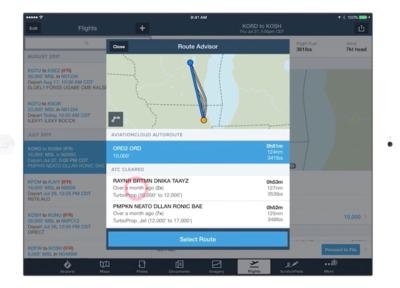
Topping the list of new stuff for version 9.3 is a graphical Route Advisor The Route Advisor tool now gives you a visual preview of all route options on an interactive map. Tap through the list to highlight each route on the map, then tap "Select Route" to add it to your flight plan. Simple and easy. The interactive Route Preview map also appears in the Flights view form-based planner to provide a quick visual reference of your route. Your departure and destination airports are shown overlaid on a simple basemap.
Other flight planning features include Performance-based Step Climb Legs in Navlog. The flight planning engine calculates the highest possible initial altitude, then automatically creates step-climb legs as the aircraft weight decreases. Step-climb information is detailed in the printable Navlog, accessible from the Flights view by tapping the Navlog button; Flight Notifications. After filing your flight plan in ForeFlight, you will receive a push notification to your device when ATC issues a revised expected route and when adverse weather conditions arise that may affect your flight. Access weather alerts in the Messages tab in the Flights view. Flight Notifications are available to customers on all ForeFlight plan levels who file flight plans via ForeFlight, and; Flight Planning Workflow Enhancements. The Add Next Flight button in the Flights view makes it faster and easier to plan multi-leg flights by carrying forward departure, aircraft details, payload, fuel policy, and more. In addition, you can
now export your flight plan in the official ICAO format and print, email, share via AirDrop, or save a copy in ForeFlight Documents.
The ForeFlight map engine has a significantly upgraded basemap, which now renders more quickly, smoothly, and with sharper depiction of features such as major roads, railways, national parks, and state and national boundaries.
In the Map Settings menu, choose from multiple terrain presentations: Colored, Shaded, or Off. Shaded Terrain uses grayscale shading to depict terrain, providing the same level of detail as the colored terrain option with less visual distraction.
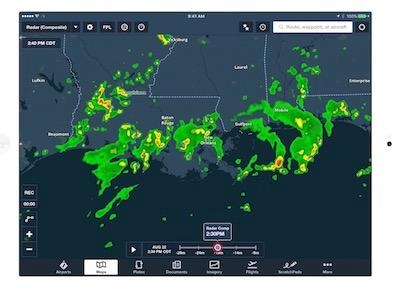
A new interactive Time Slider control provides frame-by-frame control over playback of Radar and Satellite weather layers. Use the familiar play button to automatically play through each frame. To manually control playback, tap-hold on the Time Slider and drag left or right to move between frames, or tap on the line to the left or right of the slider marker to advance it one frame at a time in either direction.
For customers flying with the SiriusXM SXAR1 aviation receiver, you will now see Icing, Turbulence, and Surface Analysis layers as part of your SiriusXM Pilot for ForeFlight subscription. Quickly scrub between altitudes using the altitude slider on Icing and Turbulence layers. Refer to the Pilot’s Guide or the ForeFlight Mobile Legends Guide for more details on interpreting these new weather layers.
There are also a few new features for the web-based product, including:
- Detailed, printable Navlog syncs between web and mobile
- Improved Navlog interface that expands for better viewing
- Just like in ForeFlight Mobile, the Add Next Flight button improves multi-leg flight planning
- Faster radar loading
(Images from ForeFlight website)



 ANN's Daily Aero-Term (12.08.25): Decision Altitude (DA)


 See All