
Wed, Sep 11, 2019
Includes New VFR Flyway Charts
Steer clear of Bravo airspace and commercial traffic with new VFR planning charts included with the latest release of ForeFlight ... Version 11.7.

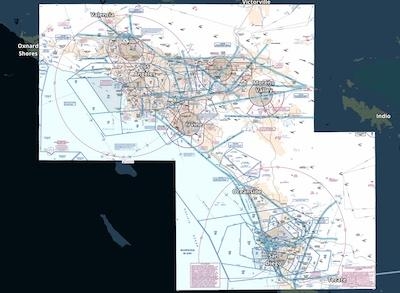
Download and view the FAA's newly georeferenced VFR Flyway Charts directly on ForeFlight’s map for improved VFR flight planning in big cities. The charts depict potential VFR routes through and around 19 major U.S. metropolitan areas, helping you circumvent Class B airspace and high-traffic areas and providing increased visual awareness.
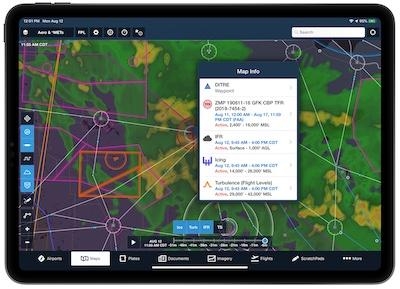
The new version also includes a number of improvements allow users to do more with map layers and the single-tap gesture. Enable multiple shape-based map layers like TFRs and AIR/SIGMET/CWAs simultaneously, then tap where they overlap to select which one you want to view information about. This multi-layer “Map Info” popup also allows you to select elements from other map layers like winds aloft barbs, PIREPS, lightning, obstacles, and Aeronautical Map elements like waypoints and airways. Users can also now tap on FBO markers that are built into ForeFlight’s Aeronautical Map airport diagrams to quickly access information about them.

Additionally, users can share aircraft profiles in ForeFlight with other pilots for easy collaboration when flight planning. Tap the Send To button while viewing an aircraft to share it via Airdrop, email, text, or any other messaging app. The recipient can then tap the link on their iPad or iPhone to accept the share. Shared aircraft are read-only, so recipients can't change any of the aircraft's details, but any changes made by the original owner are automatically synced to any recipients.
Recipients must be running ForeFlight version 11.7 or above to accept shared aircraft. Aircraft shared from a Performance Plus account to a non-Performance account will not include the ForeFlight Performance Profiles, as these are only available with Performance Plus.
ForeFlight customers in Europe can now view graphical enroute NOTAMs as part of the NOTAMs/TFRs map layer. ForeFlight uses geographic data contained in NOTAM descriptions to draw their actual shapes whenever possible, and color-codes NOTAMs gray, orange, or red based on increasing severity and type. Tap on each NOTAM to view its description and active times.
(Source: ForeFlight. Images provided)
More News
Cooperative Surveillance Any surveillance system, such as secondary surveillance radar (SSR), wide-area multilateration (WAM), or ADS-B, that is dependent upon the presence of cert>[...]
Aero Linx: OX5 Aviation Pioneers Incorporated in 1955 as a Pa 501 (c)(3) Not for Profit Corporation, the OX5 Aviation Pioneers is dedicated to bringing before the public the accomp>[...]
The Pilot Appeared To Regain Control After Six Rotations And Attempted To “Fly Out” Inverted But Had Insufficient Altitude On November 8, 2025, at 1038 eastern standard>[...]
From 2018 (YouTube Edition): Aero-News Talks With The Airplane's Builder One of the many unique airplanes at AirVenture 2018 was a 1/3-scale B-17 bomber built by Jack Bally, who ta>[...]
Aero Linx: Society of U.S. Army Flight Surgeons (SoUSAFS) The Society of US Army Flight Surgeons (SoUSAFS) serves to advance the science and art of Aerospace Medicine and its allie>[...]